Velociraptor
This section documents the Velociraptor proof of concept and arranges the original deployment, client, and hunt procedures into guided journeys. Use the journey that matches your goal, or complete the Hands-on Lab to validate the full evidence path in an authorised environment.
Velociraptor is an advanced digital forensic and incident response tool that enhances your visibility into your endpoints.
It allows you to collect and analyse forensic evidence and respond to threats quickly. Velociraptor is built on Velociraptor Query Language (VQL), a flexible and powerful query language which allows you to extract and analyse data stored on endpoints, and also perform response tasks.
What Velociraptor does
Velociraptor uses a server and endpoint clients to run targeted collections, repeatable hunts, and approved response tasks. Investigators select artifacts, scope the target clients, launch a collection, and review the returned evidence without working directly on every endpoint.
It can collect defined endpoint artefacts using built-in or imported projects, run the same investigation question across selected clients, and retain the collection context alongside results, logs, and notebooks. Approved response tasks can also be performed with explicit scope and recorded outcomes.
Choose your journey
You do not need to complete every section. Choose the journey that matches what you want to accomplish:
01Deploy the server Generate the configuration, install the Linux server, and open the Admin GUI. Complete when the services respond and you can sign in.Intermediate · Linux VM · 60–90 min 02Connect Windows clients Build or use an MSI package and register a Windows endpoint. Complete when the client appears in the Admin GUI.Intermediate · Server + Windows VM · 30–45 min 03Create and review hunts Collect process evidence, label clients, and search by filename or hash. Complete when a hunt result supports a documented finding.Beginner · Connected client · 45–60 min 04Go hands-on Practise in the browser or validate the complete workflow in your own VMs. Complete when another analyst can review your evidence.Beginner to intermediate · Two routes
How evidence moves through this PoC
When troubleshooting, follow the path from left to right. Confirm the endpoint is connected before checking artifact selection, hunt scope, collection state, and returned rows.
Before you begin
You will need an Ubuntu server, a Windows endpoint, administrator access, and an isolated network. The server and client must be able to reach each other, and their clocks should be synchronised before evidence is collected.
Use an isolated, authorised lab
Deploy clients and collect evidence only on systems you own or are authorised to examine. Protect server configuration files and credentials, record collection scope, and take recoverable VM snapshots before testing.
Troubleshooting shortcuts
| Problem | Start here |
|---|---|
| Server service or GUI is unavailable | Verify the server component |
| Windows client does not appear | Verify client connection |
| Hunt does not return expected rows | Create and review hunts |
| You need another artifact project | Import artifacts from external projects |
Lab Setup for Proof of Concept
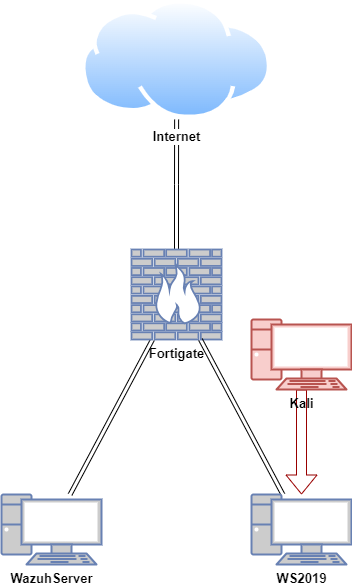
In this proof of concept, the Velociraptor server was configured on an Ubuntu virtual machine (VM), and the Velociraptor client was configured on a Windows VM. An attack simulation was conducted on the Windows hosts using a Kali machine in a safe and controlled setting.
Note: Do not attempt to replicate the attack emulation demonstrated here unless you are properly trained and it is safe to do so. Unauthorised attack emulation can lead to legal consequences and unintended damage to systems. Always ensure that such activities are conducted by qualified professionals in a secure, isolated environment.
| Host | OS | Role | IP Address |
|---|---|---|---|
| Fortigate | Fortios 7.6.0 | Firewall/Router | 192.168.1.111 (WAN) / 10.0.0.1 (LAN) |
| WazuhServer | Ubuntu 22.04 LTS | Velociraptor Server | 10.0.0.20 |
| WS2019 | Windows Server 2019 | Velociraptor Client | 10.0.0.40 |
| Kali | Kali Linux 2024.2 | Attacker machine | 10.0.0.22 |