Ransomware detection challenge
This capstone retains the original WannaCry proof of concept as a prominent investigation challenge. Its goal is not merely to execute a sample: it is to prove that Aurora detects the activity, applies the intended response, preserves useful evidence, and supports a defensible conclusion.
Specialist malware-handling controls required
Use only a disposable, isolated VM that you own and are authorised to test. Disconnect shared folders, clipboard integration, host networking, removable media, and production credentials. Create and verify a clean snapshot before introducing a sample. If any control is uncertain, use the safe interactive lab instead.
Readiness gate
Do not proceed until every item is true:
- The Windows VM has a verified clean snapshot.
- The virtual network cannot reach production systems or the internet.
- Aurora is healthy and its rules load successfully.
- The harmless Notepad response test has passed.
- Required evidence locations and recovery steps are documented.
- The operator understands the original malware-handling warning.
Investigation timeline
Record service status, profile, rule state, time, running processes, and the absence of ransomware artefacts before introducing a sample. The preserved walkthrough below contains the original detonation observations, Sigma rule, response set, commands, screenshots, and recovery instruction.
Detonating WannaCry Ransomware
The WannaCry Ransomware sample is available from this GitHub repository, which hosts live malware samples designed for the Practical Malware Analysis & Triage (PMAT) course.
The repository includes both real-world malware captured in the wild and samples crafted to mimic typical malware behaviour. These are highly dangerous and require careful handling.
Important precautions:
- Only download or run these samples on machines you own.
- Always use a virtual machine with snapshots to ensure the system can be restored to a clean state.
- Follow strict malware safety protocols while working with these samples.
Create a snapshot of the system in its pre-detonation state, ensuring the internet connection is disabled. Copy the file cosmo.jpeg to the desktop before proceeding. Execute the WannaCry ransomware and monitor its behaviour.
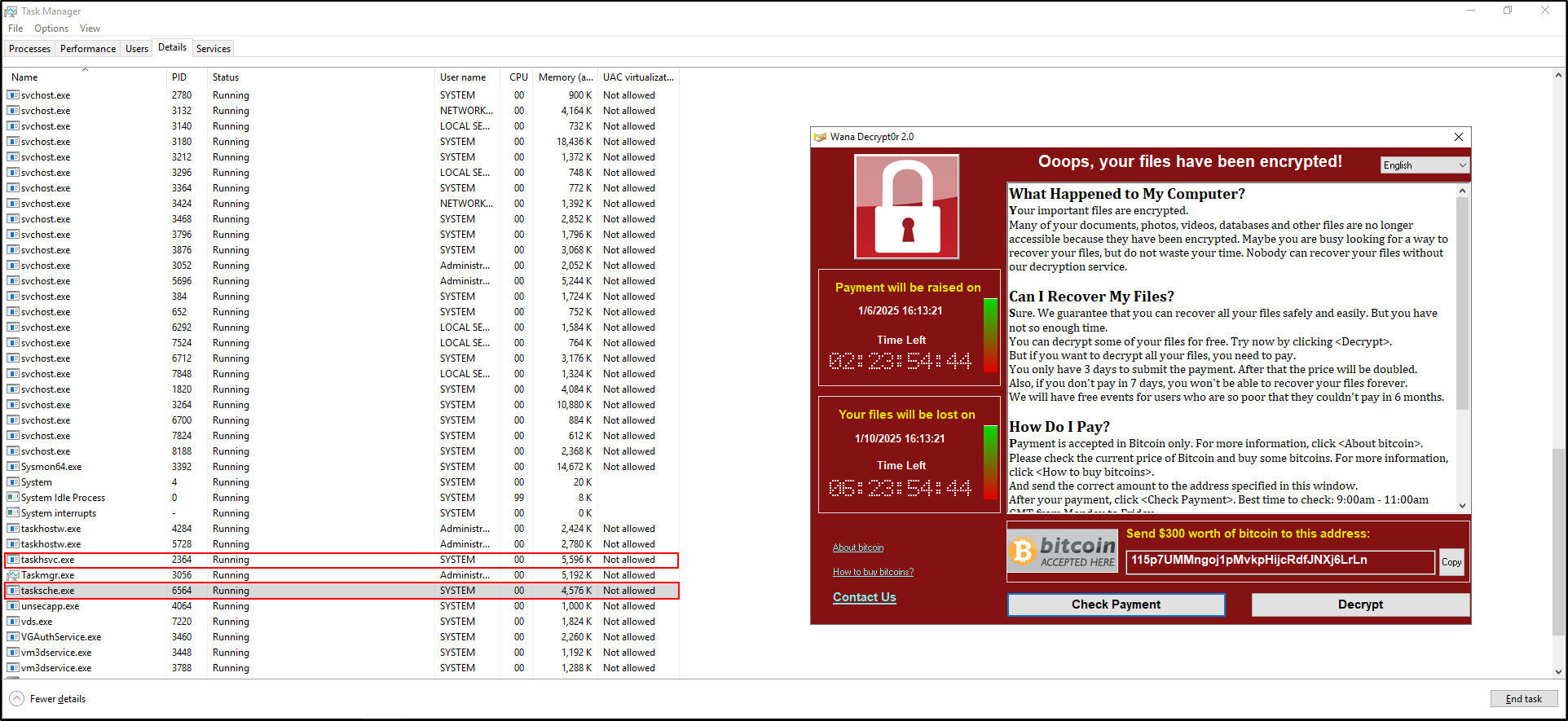
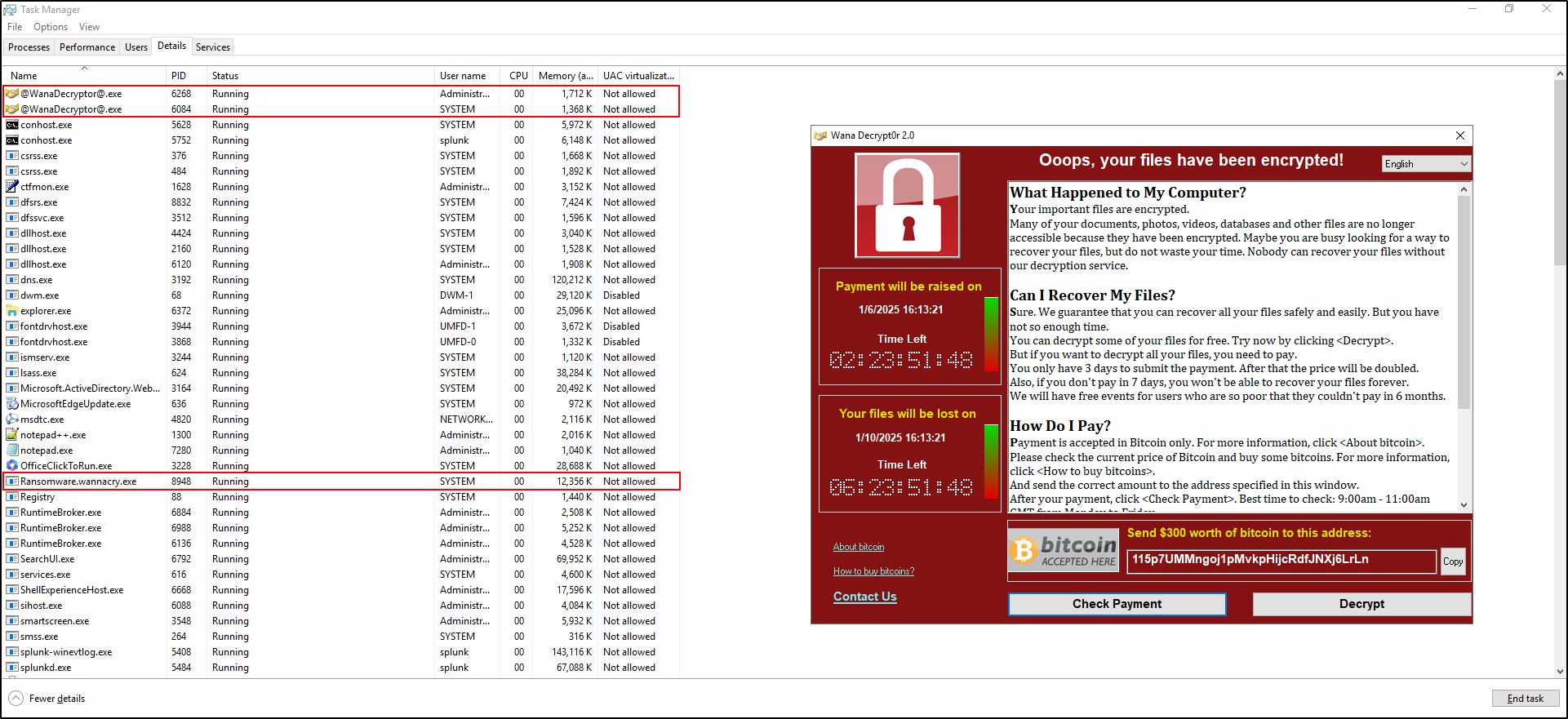
Initially, you will observe processes such as Ransomware.wannacry.exe, taskhsvc.exe, and tasksche.exe running in Task Manager. After a short time, the process @[email protected] will also appear. Key symptoms of the infection include:
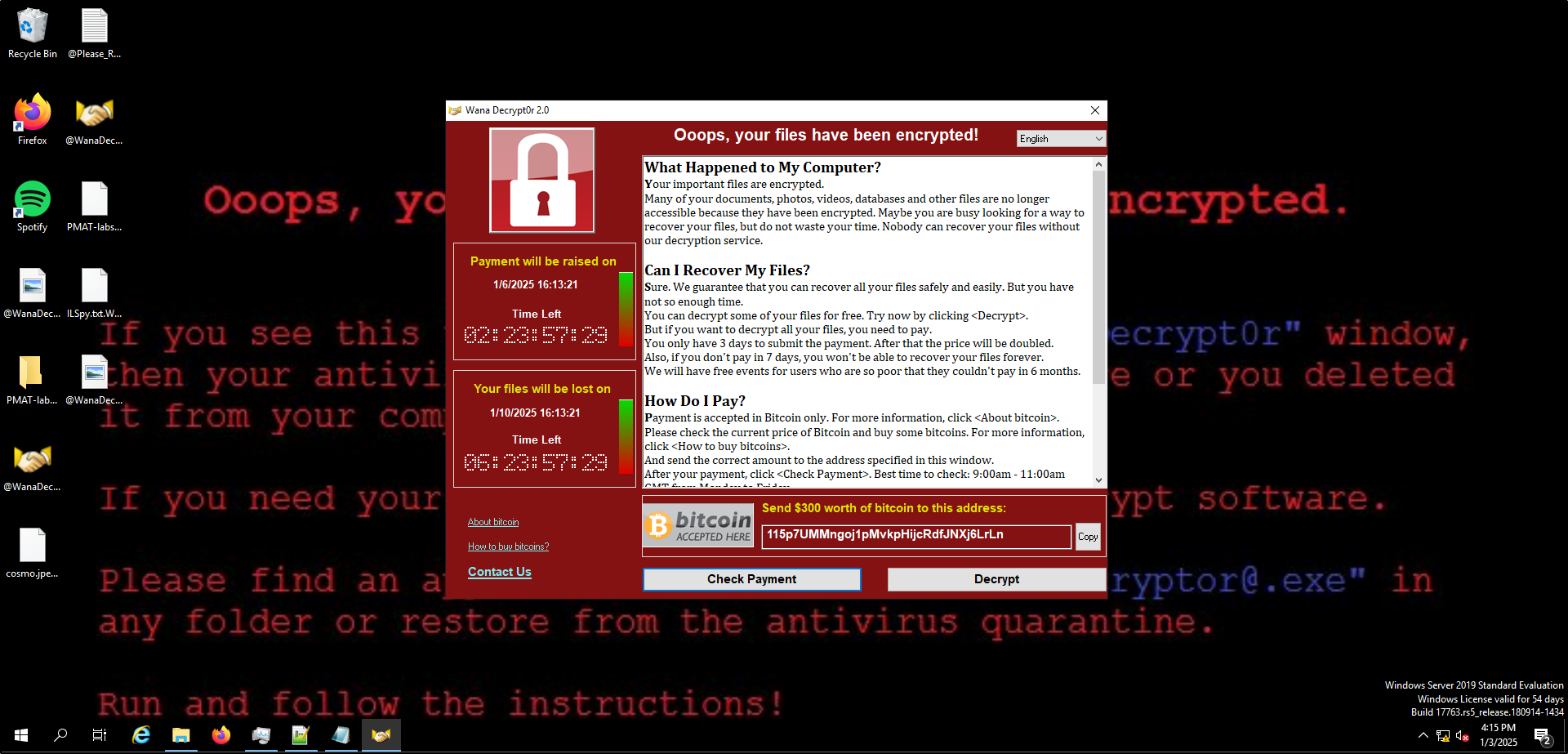
- The desktop wallpaper changes.
- A program window opens, displaying a countdown timer, ransom demand, and payment options.
- Files on the system are encrypted with the
.WNCRYextension. - Two new files appear on the desktop:
@WanaDecryptor@(executable) and@Please_Read_Me@(text file).
After completing your observations, revert the system to its pre-detonation snapshot to restore its original state.
Suspending WannaCry Processes
Create a Sigma Rule and Response Set for WannaCry
Create a Sigma rule to detect the WannaCry Ransomware. Save the following Sigma rule as proc_creation_wannacry.yml in C:\aurora\custom-signatures\sigma-rules:
title: Detect WannaCry Processes
id: wannacry-detection-rule
status: test
description: Detects processes associated with WannaCry ransomware.
tags:
    - ransomware
    - wannacry
logsource:
    category: process_creation
    product: windows
detection:
    selection:
        Image|endswith:
            - '\taskhsvc.exe'
            - '\tasksche.exe'
    condition: selection
falsepositives:
    - None
level: high
Create a response set to suspend WannaCry processes. Save the following response set as suspend_wannacry.yml in C:\aurora\response-sets:
description: Suspend WannaCry processes for testing and containment
response:
    type: predefined
    action: suspend
    lowprivonly: false
    ancestors: 0
    recursive: false
rule-ids:
    - 'wannacry-detection-rule'
Note: The suspend action temporarily halts the targeted process, while the kill action terminates it. For demonstration purposes, we used suspend since it allows you to visually verify the process status in Task Manager. In a real-world scenario, the kill action would typically be more appropriate to immediately neutralise the threat.
Use the Aurora Lite agent to install and activate the response set with the following command:
aurora-agent.exe --install --response-set c:\aurora\response-sets\suspend_wannacry.yml --activate-responses
Ensure the following:
suspend_wannacry.ymlis located inC:\Program Files\Aurora-Agent\response-sets.proc_creation_wannacry.ymlis located inC:\Program Files\Aurora-Agent\custom-signatures\sigma-rules.
Execute the WannaCry ransomware, ensuring the internet is disconnected.
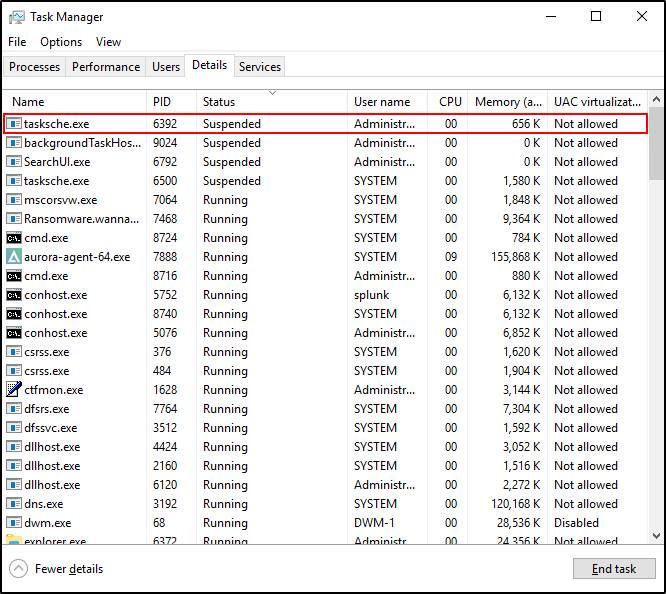
Open Task Manager and verify that the tasksche.exe process is suspended. Please note that it may take some time for the tasksche.exe process to appear as suspended in Task Manager.
Verify that a Sigma rule match is identified for WannaCry ransomware activity in the Windows Event Log under the Application category.
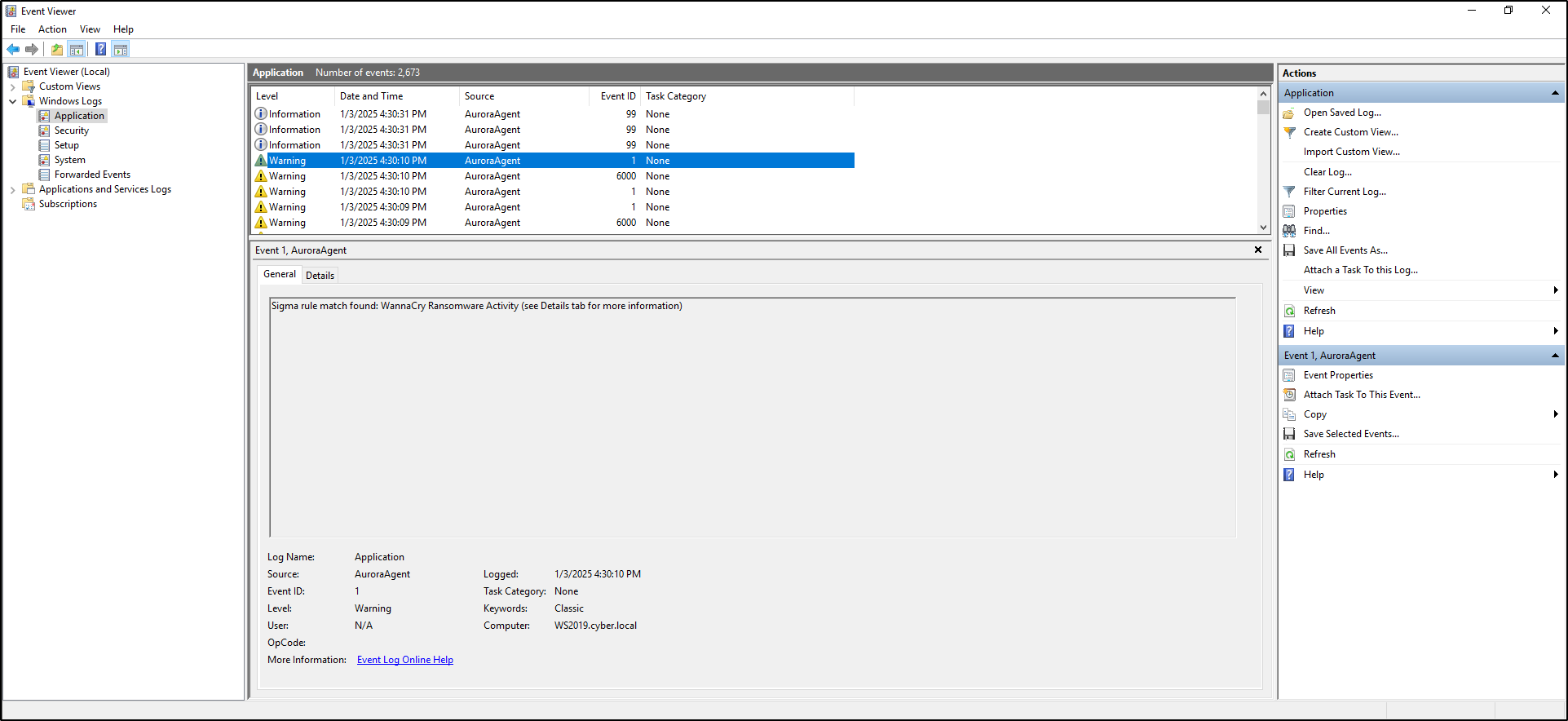
Revert the VM to its pre-detonation snapshot to remove any changes made by WannaCry ransomware.
Challenge questions
- Which Aurora event first identifies the ransomware-related process?
- What fields connect the process to the configured Sigma rule?
- Which response action ran, and what evidence shows its outcome?
- What did Aurora prevent, and what does the available evidence not prove?
- Would the same rule be safe in blocking mode on a production endpoint?
Evidence and recovery
Preserve the alert details, relevant timestamps, rule and response configuration, process evidence, screenshots, observed effect, and limitations. Then power off the VM and revert to the verified pre-detonation snapshot; do not attempt to “clean” the working snapshot for reuse.
Challenge complete
You can reconstruct the detection and response timeline, state a bounded conclusion, and prove that the disposable VM was returned to its clean snapshot.