Aurora Lite
Aurora Lite is a free Windows Endpoint Detection and Response tool from Nextron Systems. It monitors Windows activity through Event Tracing for Windows, evaluates Sigma rules and Indicators of Compromise, records detections, and can perform configured response actions.
This section preserves the original proof-of-concept procedures and screenshots while organising them into shorter, outcome-focused journeys similar to the Splunk guide.
What Aurora Lite does
CollectObserve selected Windows activity through ETW event sources.
DetectMatch Sigma rules, IOCs, and configured warning signs.
InvestigateReview the matching event, process, user, file, and network context.
RespondSimulate, suspend, terminate, or run a carefully tested custom action.
Use an isolated, recoverable lab
Response actions can interrupt legitimate processes, while the ransomware challenge involves live malware. Begin with harmless function tests and a reversible Notepad response. Use the advanced challenge only with specialist malware-handling controls, authorisation, isolation, and clean snapshots.
Choose your journey
How endpoint activity moves through this PoC
Lab architecture
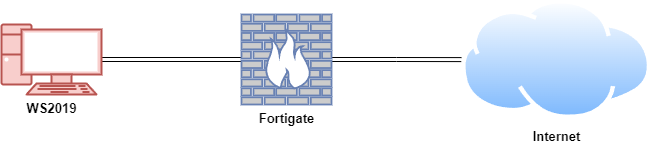
The preserved proof of concept used Aurora Lite on a Windows Server 2019 VM behind a FortiGate lab firewall. Adapt addresses consistently and use supported Windows and Aurora releases for a new build.
| Host | Demonstrated platform | Role | Demonstrated address |
|---|---|---|---|
| FortiGate | FortiOS 7.6.0 | Lab firewall and router | 192.168.1.111 WAN / 10.0.0.1 LAN |
| WS2019 | Windows Server 2019 | Aurora Lite endpoint | 10.0.0.140 |
New to Aurora Lite?
Start with the interactive lab, then complete the harmless installation and function-test journeys before enabling responses.
Preserved proof-of-concept material
The original procedures, command examples, observations, response configuration, and screenshots are arranged within the relevant journeys: installation material is under Install, signature and removal guidance is under Configure, function tests are under Test & investigate, and the response demonstrations are under Respond and Ransomware challenge.